PPC Budget Optimisation: Where to Move Spend and Why
PPC Budget Optimisation: Where to Move Spend and Why
PPC budget optimisation means moving money from what does not convert to what does, not simply spending less. The hard part is rarely the theory. It is finding the answers in your own Google Ads, Analytics and Search Console data quickly enough to act on them. With Caybl you connect those accounts to Claude or ChatGPT and ask which campaigns are wasting spend, in plain English, against your live data.
TL;DR
- Optimising a budget is reallocating it towards campaigns that meet your cost per acquisition (CPA) or return on ad spend (ROAS) targets, not cutting it across the board.
- Work backwards from a target number of conversions to a budget: conversions, divided by conversion rate, multiplied by cost per click.
- Before raising a budget, check efficiency, conversion volume and lost impression share. A campaign that spends its whole budget is not automatically a campaign that deserves more.
- Review weekly for movement and monthly for allocation, and check that conversion tracking is right first.
- Ask your live account data questions in plain English through Caybl, with every change previewed before it applies.
Table of Contents
- What budget optimisation actually means
- Set a starting budget from a goal, not a guess
- The signals that show where budget is working or wasted
- When to move budget, and when not to
- Use Google’s own reallocation tools as a starting point
- A simple split for a new account
- How often to review
- Why the analysis is the slow part
- Check the data before you act on an AI answer
- Where Caybl fits in your budget routine
- Try it on your own accounts
- Our view on budget optimisation
- FAQ
- Sources
What budget optimisation actually means
The word “optimisation” is often read as “cut”. It is closer to “redirect”. Most accounts carry some spend on keywords that never convert, ads shown at the wrong times and landing pages that do not turn clicks into enquiries. Removing that waste and putting the money behind proven campaigns can hold or even improve return, even if total traffic falls, as one UK agency’s analysis of budget cuts puts it.
So the working definition is simple: every pound should sit where it earns the most conversions or conversion value for your goal. That needs three things: a target (a CPA or ROAS you can afford), reliable conversion tracking, and a regular look at which campaigns are above or below target.
Set a starting budget from a goal, not a guess
If you are setting a budget for the first time, or sanity-checking an existing one, work backwards from the outcome you need. The formula is:
Budget = desired conversions ÷ conversion rate × average cost per click (CPC)
A worked example. You want 60 enquiries a month. Your site converts 4% of paid clicks and your average CPC is £2.50.
- 60 ÷ 0.04 = 1,500 clicks needed.
- 1,500 × £2.50 = £3,750 a month.
- Divide by 30.4 (the average days in a month) for a daily figure of about £123.
Then add room to experiment. Search Engine Land’s budget-planning guide suggests starting bottom-up from a target conversion volume and reserving 5 to 15% of budget for tests. On our example that is roughly £190 to £560 a month set aside for new keywords or audiences.
To see whether your assumptions are realistic, Google’s own Google Ads cost estimator gives budget benchmarks by industry and location. Your CPC and conversion rate should ultimately come from your own account, and you can calculate cost per lead from the same numbers to see whether the result is affordable for your margins.
The signals that show where budget is working or wasted
Google’s guidance on using data to optimise Search campaigns lists the core metrics: conversion rate, conversion value, ROAS, impressions, clicks, click-through rate, cost, cost per conversion and average CPC. It also says conversions are among the most important. In practice, a handful of questions do most of the work:
| Question | What to look at | What it tells you |
|---|---|---|
| Is this campaign profitable? | Cost per conversion or ROAS against your target | Whether it deserves more, the same or less |
| Is budget the limit? | Impression share and share lost to budget | Whether valuable traffic is being missed |
| Is spend landing on the right searches? | Search terms report | Whether money goes on irrelevant queries |
| Are conversions real? | Conversion tracking and Analytics data | Whether the numbers you optimise towards can be trusted |
| Is quality holding as spend rises? | Qualified conversion volume and lead quality | Whether scaling magnifies a problem |
Impression share matters because a figure well below 100% can signal a budget or bidding issue. The reverse is also true. When it is already near 100%, spending more will not buy meaningful extra volume, a trap Search Engine Land warns about when leadership asks for more spend on a saturated campaign.
When to move budget, and when not to
A campaign that spends its entire daily budget is not, on its own, a reason to increase it. Augurian’s paid media team says to check efficiency against CPA or ROAS, volume stability and lost impression share first, because if conversion rates are falling or lead quality is slipping, a bigger budget magnifies the problem.
A practical decision rule:
- Scale up when CPA or ROAS meets target consistently, qualified conversions stay stable as spend rises, and impression share lost to budget shows good traffic being missed.
- Hold when the campaign is on target but already captures nearly all available impressions.
- Cut or redirect when CPA makes profit impossible, when search terms drift away from your goal, or when tracking shows conversions that do not match real business results.
Two practical details help. First, Google Ads can spend more than the daily budget on busy days while staying within the monthly cap, so judge pacing over the month, not one day. Our guide to Google Ads budget pacing covers how to stay on track. Second, automated bidding needs data to learn from. Augurian’s Jon Mosier notes that Google’s automation performs best with at least 30 conversions in 30 days. If a campaign is below that, consolidating budget into fewer campaigns often helps more than splitting it thinly.
Use Google’s own reallocation tools as a starting point
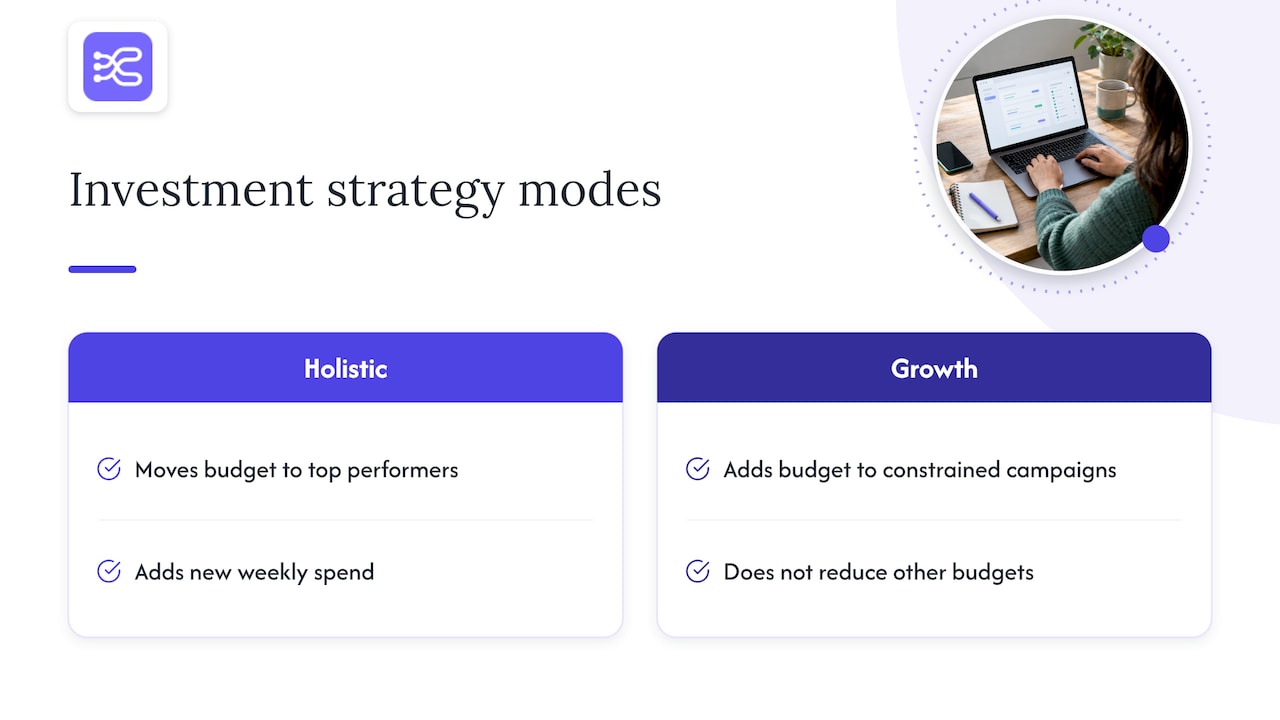
Google Ads has a feature called Recommended Investment Strategy. According to Google’s help documentation, you pick an optimisation goal (clicks, conversions or conversion value) and a mode. Holistic mode moves existing budget from lower-efficiency campaigns to top performers and adds new weekly spend. Growth mode only adds budget to constrained campaigns without reducing any others. A seven-day forecast shows the predicted result at each spend level.
These suggestions are only as good as your conversion data and goals, so they work best alongside your own analysis of which campaigns genuinely drive business results.
If you run several channels, Google’s cross-channel bid optimisation aims to maximise marginal CPA or ROAS in each auction across channels, which improves how the overall budget is used compared with optimising each channel alone.
A simple split for a new account
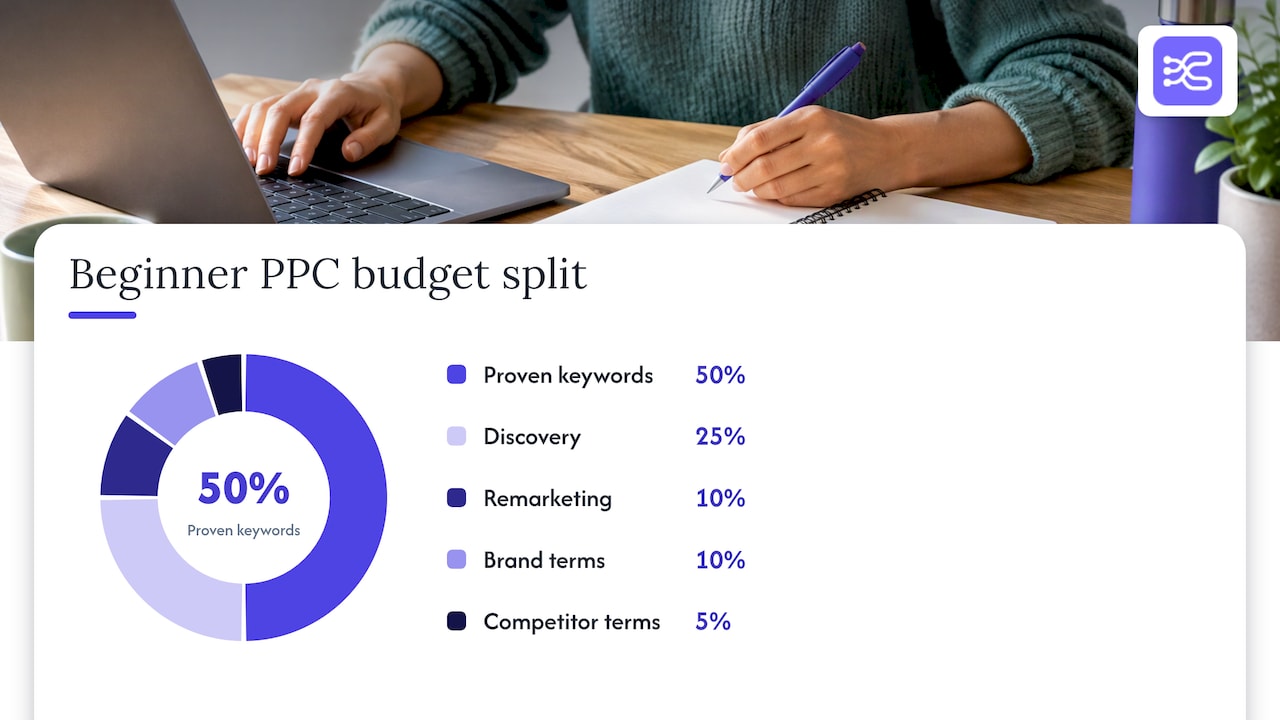
If you have no history, a rule of thumb gives you somewhere to start. One published beginner split from ppc.io puts 50% on proven, tested keywords, 25% on discovery, 10% on remarketing, 10% on brand terms and 5% on competitor terms. Treat it as a first draft. After a few weeks of data, your own CPA by campaign should overrule it.
How often to review
A rhythm that works for most small teams:
- Weekly: check pacing, any campaign limited by budget, new wasteful search terms and sudden traffic shifts. Look at the cause before you react to a drop.
- Monthly: compare each campaign’s CPA or ROAS with target and move budget between them. Revisit your forecast against actual conversions.
- Quarterly: check that conversion tracking still captures what the business cares about, and rebuild your forecast with fresh conversion rate and CPC figures.
The common mistakes follow from skipping these checks: raising budgets on saturated campaigns, changing budgets so often that automated bidding never settles, judging results from one day, and optimising towards conversions that do not reflect real revenue. Our routine for optimising Google Ads campaigns walks through the full cycle.
Why the analysis is the slow part
Each of the checks above sits in a different place. Cost and impression share are in Google Ads. Real conversions and the behaviour behind them are in Google Analytics. Ranking and organic changes are in Search Console. Pulling them together by export and spreadsheet takes hours, so reviews slip, and money keeps going to waste in the meantime.
That is the problem we built Caybl to remove. It connects Google Ads, Google Analytics and Search Console to Claude and ChatGPT, so you ask questions about your own accounts and get answers from your live data. There are no exports, no spreadsheets and no dashboard to learn. Questions that map straight onto budget optimisation include:
- Which campaigns are wasting spend this month?
- Which campaigns are losing impression share because of budget?
- Why did traffic drop last week?
- Which search terms spent money without a conversion?
You can also see how the pieces fit in our guides to campaign performance analysis and to linking Google Analytics and Google Ads, which gives your budget decisions better conversion data.
Check the data before you act on an AI answer
Whichever assistant you use, treat its first answer as a draft of your analysis. A sensible habit is to ask it to state the account, currency, date range, time zone and whether the data pull was complete before it draws conclusions. That is the advice of one practitioner’s guide to connecting ad platforms to Claude, which also recommends starting with read-only access. With Caybl, access is scoped to what you approve, changes are previewed before they apply, and you can disconnect in one click, so you decide what happens to your budgets.
Where Caybl fits in your budget routine
Here is how the routine above maps to Caybl:
- Weekly pacing and wasted spend: ask which campaigns are overspending or wasting budget, and get the answer without opening an export.
- Monthly reallocation: ask which campaigns sit above or below your CPA target, then review the proposed change in a preview before it is applied.
- Tracking check: ask your assistant to audit tracking so you optimise towards conversions that reflect real results.
- Reporting: agencies and in-house teams can answer client or stakeholder questions in plain English instead of building a report first. See our guide to paid search reporting.
New to connecting Claude to Google Ads? Our guide to four ways to connect Google Ads to Claude lays out the options, and for ChatGPT see how to connect Google Analytics to ChatGPT.
Try it on your own accounts
Setup takes about two minutes with a Google sign-in. Connecting Google Analytics is free, and the Free plan costs $0. Pro is $29 per month and adds Ads, Search Console and more. Team starts from $20 per month per seat, and extra usage comes as 500 credits for $6 one-off. A 60% discount for the first month is also listed. See the details on the Caybl pricing page.

Our view on budget optimisation
Most wasted PPC money is not wasted because marketers lack a strategy. It is wasted because the evidence is spread over three tools and nobody has time to join it up every week.
We think the best budget decisions come from asking plain questions of live data: which campaigns miss their target, where is budget limiting good traffic, and do the conversions we count match real results? When the answer takes seconds, the review happens weekly rather than quarterly, and the money moves sooner.
That is why we built Caybl around Claude and ChatGPT: you keep your own judgement about budgets, and the assistant does the digging. Every change is previewed before it applies, so you stay in control of the spend.
Gearoid
FAQ
How much should I spend on PPC?
Start from the outcome you need. Divide your target conversions by your conversion rate, then multiply by your average CPC, and add a testing allowance of 5 to 15%. Google’s cost estimator gives industry and location benchmarks to check your assumptions against.
Is it better to cut budget or optimise it?
Optimising usually means redirecting spend rather than reducing it. Removing non-converting keywords and placements and concentrating money on proven campaigns can keep return steady even if traffic falls. Cut outright only when a campaign’s CPA makes profit impossible.
How do I know if budget is limiting a campaign?
Look at impression share and the share lost to budget in Google Ads. A figure well below 100% alongside good CPA or ROAS suggests valuable traffic is being missed. If impression share is already near 100%, more budget is unlikely to add much volume.
Can Claude or ChatGPT optimise my budget for me?
They can analyse your connected data and answer questions such as which campaigns waste spend. Through Caybl, changes are previewed before they apply, so you approve every budget move yourself.
Sources
- PPC budgeting under pressure: how to protect ROI
- PPC budget planning: aligning business goals, ad spend and performance
- Google Ads cost estimator
- Use data to optimise your Search campaigns, Google Ads Help
- How to do a PPC analysis
- PPC budgeting guide, Augurian
- About Recommended Investment Strategy, Google Ads Help
- Cross-channel bid optimisation, Google Ads Help
- PPC budget planning 101, ppc.io
- Connecting ad platforms to Claude Code
- Cost per lead: how to calculate it